Tabs on Mac
How to see all open tabs on a Mac
The quick answer
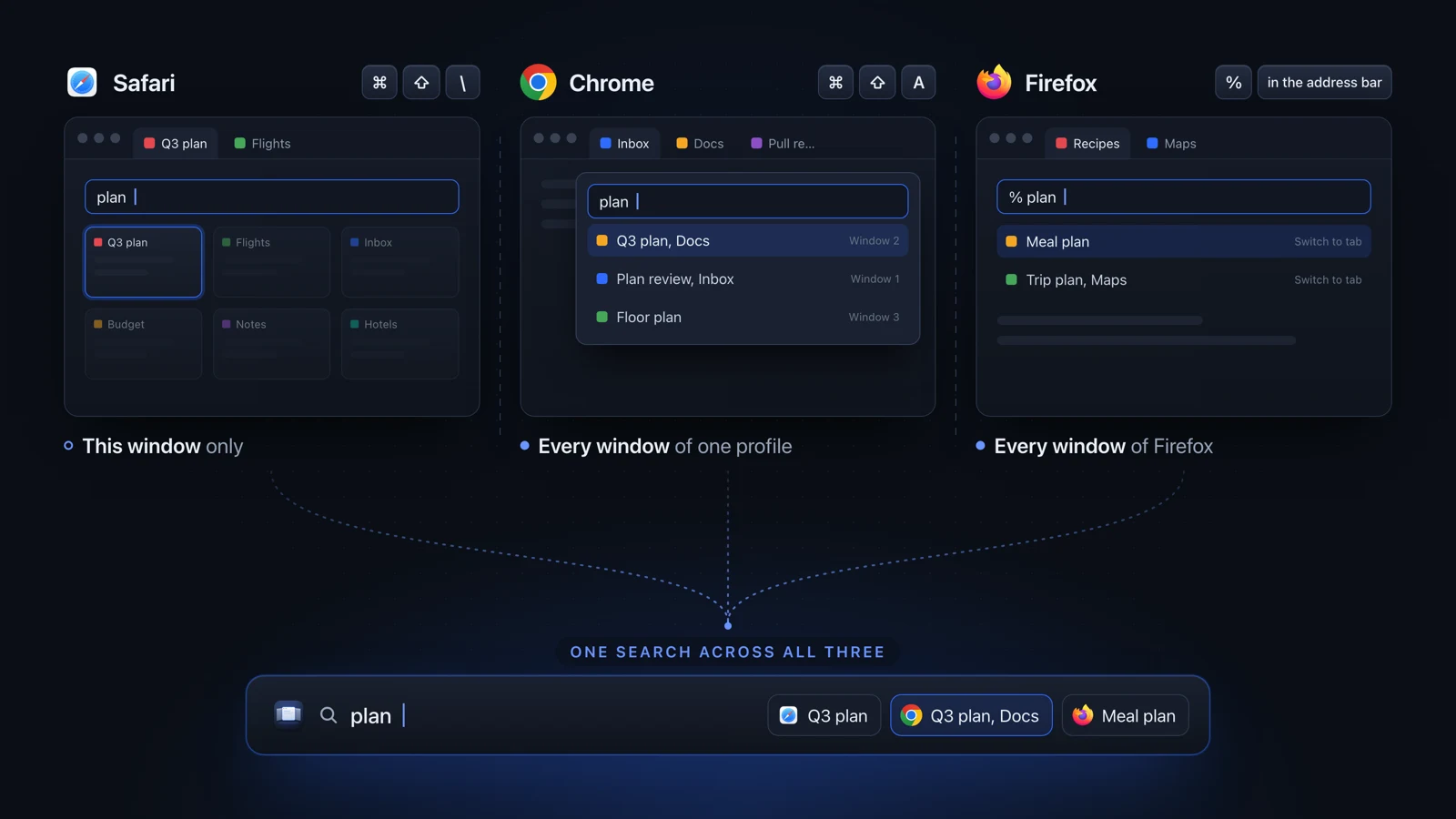
To see all open tabs on a Mac, use your browser's tab search. Press Command-Shift-A for Chrome's Tab Search, type % and a word in Firefox's address bar, or press Command-Shift-Backslash for Safari's Tab Overview. Chrome and Firefox search every window, Safari just the one you are in. No browser can see another browser's tabs.
Julien Schweter Updated 5 min read
The short version
- Press Command-Shift-A for Chrome's Tab Search. It covers every window of the profile you are using.
- Firefox searches the tabs of every window when you type % and a word in the address bar.
- Safari's Tab Overview (Command-Shift-Backslash) shows and filters the tabs of one window.
- macOS has no tab search of its own, and Mission Control never lists the tabs inside a window.
- To see all tabs Mac-wide, in several browsers at once, you need a switcher that reads them from outside.
Each major Mac browser can search its own open tabs. They differ in the key and in how many windows they cover.
| Item | How to open it | What it searches |
|---|---|---|
| Chrome | Command-Shift-A, or type @tabs and a space in the address bar | Every window of the profile you are in |
| Firefox | Type % and your words in the address bar | Every Firefox window |
| Safari | Command-Shift-Backslash opens Tab Overview, then type | The window you are in |
| Edge | Open Tab search, then type a keyword | Every open Edge window |
| Brave | The tab search icon in the toolbar | Brave's own tabs |
| Arc | Command-T opens the Command Bar, then type | Arc's own tabs |
The keys come from Google's Chrome help, Mozilla's Firefox help and Apple's list of Safari shortcuts. Each search works only from inside its browser, so you switch to that browser first.
None of them can look past their own browser, and Safari's search does not look past the current window.
| Item | Other browsers | All its windows | From any app | Shows pictures |
|---|---|---|---|---|
| Chrome's Tab Search One Chrome profile at a time. | ||||
| Firefox's tab search | ||||
| Safari's Tab Overview Thumbnails of the tabs in one window. | ||||
| Edge's Tab search | ||||
| Arc's Command Bar | not documented | |||
| Better Window Switcher Chrome, Safari, Firefox, Brave, Edge, Vivaldi and Opera. Not Arc. | yes, after one visit |
-
Press Command-Shift-A
Or type @tabs in the address bar and press Space.
-
Type a few words from the site or page title
-
Select the tab in the list
Chrome switches to it, in whichever window it is in.
Tabs in your other Chrome profiles stay out of the list. The full guide to Chrome's Tab Search on a Mac covers the button and its limits. For too many Chrome windows, see switching between many Chrome windows.
-
Click the address bar
-
Type % and then your words
The % limits the suggestions to open tabs.
-
Pick the tab from the results
Firefox jumps to it, even when it is in another window.
-
Press Command-Shift-Backslash
Tab Overview shows every tab of this window as a thumbnail.
-
Type in the search field at the top
The thumbnails narrow to the tabs that match.
-
Click the tab you want
-
Open Tab search
-
Type a word from the tab you want
-
Select it
Microsoft's Tab search page says it scans every open Edge window.
-
Click the tab search icon in the toolbar
-
Type a word from the tab you want
-
Select it from the list
-
Press Command-T
It opens the Command Bar.
-
Type the name of the tab
-
Pick the tab from the results
Each browser only knows its own tabs, so one search over all of them takes an app that runs outside every browser.
- Mac-wide tab switchers read the tab bars of several browsers and put the tabs in one list or view.
- They differ most on Firefox, which many tools skip, and on Arc. See tab switchers for Mac, compared by browser for who covers what.
- TabTab is one of them, covering many browsers and apps. See Better Window Switcher vs TabTab.
- Every tab shortcut on a Mac has the keys for moving between tabs in each browser, for each keyboard layout.
- If Safari only finds tabs in one window, search Safari tabs in every window has the workarounds.
Questions people ask
Is there a way to search all open tabs?
Yes, within one browser. In Chrome, Command-Shift-A searches every window of your profile. Firefox searches every window when you type % in the address bar. Safari's Tab Overview only searches the window you are in. To search all open tabs across several browsers at once, you need a Mac-wide switcher such as TabTab or Better Window Switcher.
How do I view all my open tabs on Mac?
Open your browser's tab view. Safari's Tab Overview (Command-Shift-Backslash) shows the current window's tabs as thumbnails. Chrome's Tab Search (Command-Shift-A) lists the tabs of every window. In Firefox, the List all tabs button at the right end of the tab bar lists every open tab. Finder and other apps with macOS tabs have View, Show All Tabs.
Can Mission Control show Chrome tabs?
No. Mission Control shows the windows on your desktop, so a Chrome window with twenty tabs appears once, showing only its front tab. To see the tabs themselves, press Command-Shift-A for Chrome's Tab Search, or use a switcher that shows each tab as its own card, such as Better Window Switcher.
Which browsers can Better Window Switcher search tabs in?
Chrome, Safari and Firefox, which have been measured on a real Mac, plus Brave, Edge, Vivaldi and Opera. Arc is not supported, because its sidebar is not a normal tab bar. A Safari tab shows Safari's icon until the switcher has seen that tab in front. Other tools read other browsers, and the tab switchers comparison on this site shows which.
Why does Safari not find tabs in my other windows?
Tab Overview belongs to a single window, so its search only looks at the tabs of the window you opened it from. To search everything in Safari, choose Window, Merge All Windows to put every tab in one window, then press Command-Shift-Backslash and type. A Mac-wide switcher can search every Safari window without merging them.
Is there a keyboard shortcut to see all open tabs?
Yes, but each browser has its own. Command-Shift-A opens Tab Search in Chrome, Command-Shift-Backslash opens Tab Overview in Safari, and Command-T opens Arc's Command Bar. In Firefox, typing % in the address bar does the same job. macOS has no shortcut that shows tabs across apps.
Checked on Apple's Safari and Mac guides for macOS 27, and Google's, Mozilla's and Microsoft's help pages, September 2026.
Read next
 Tabs on Mac Every tab shortcut on a Mac How to switch tabs on a Mac in Safari, Chrome, Firefox, Edge, Brave and Arc: next and previous tab, tab by number, last used tab, from each maker's docs.
 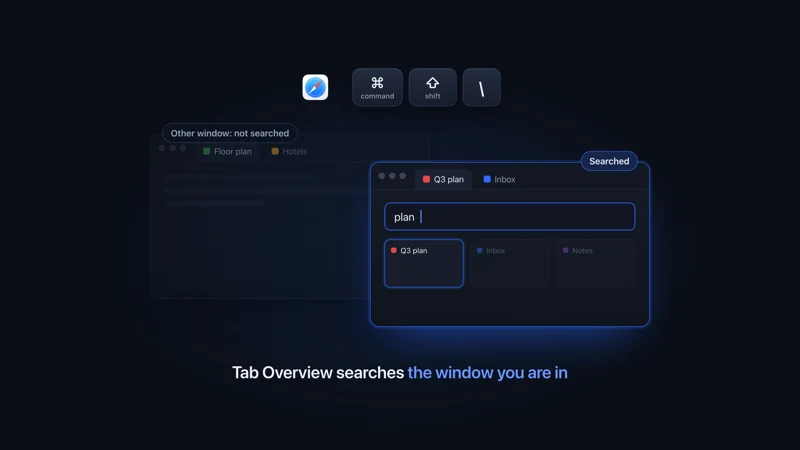 Safari on Mac Search Safari tabs in all windows Search Safari tabs on a Mac with Command-Shift-Backslash. It only looks in the front window. To reach every window, merge them for free or add a tool.
 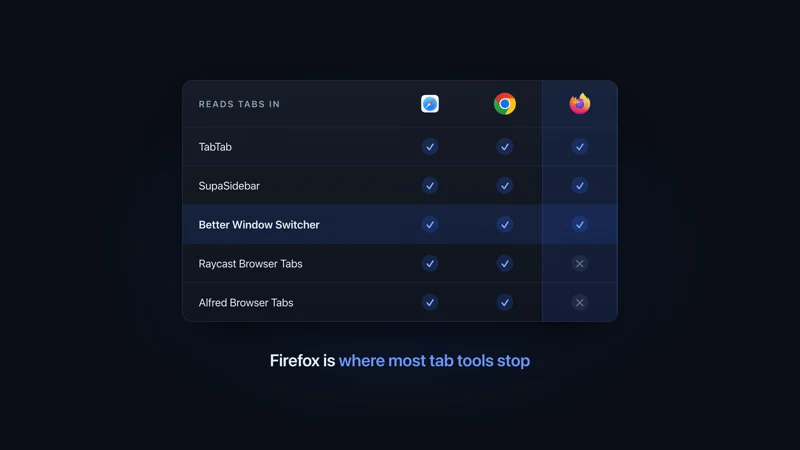 Tab apps for Mac Tab switchers for Mac, compared Tab switchers for Mac compared by browser: which ones read Safari, Chrome, Firefox and Arc tabs, which switch windows too, and what each one costs.
 - Comparison vs TabTab Deep tab coverage vs a 3D scene with nothing held back.
More comparisons
Compare to other popular apps