Tabs on Mac
How to switch tabs on a Mac, in six browsers
The quick answer
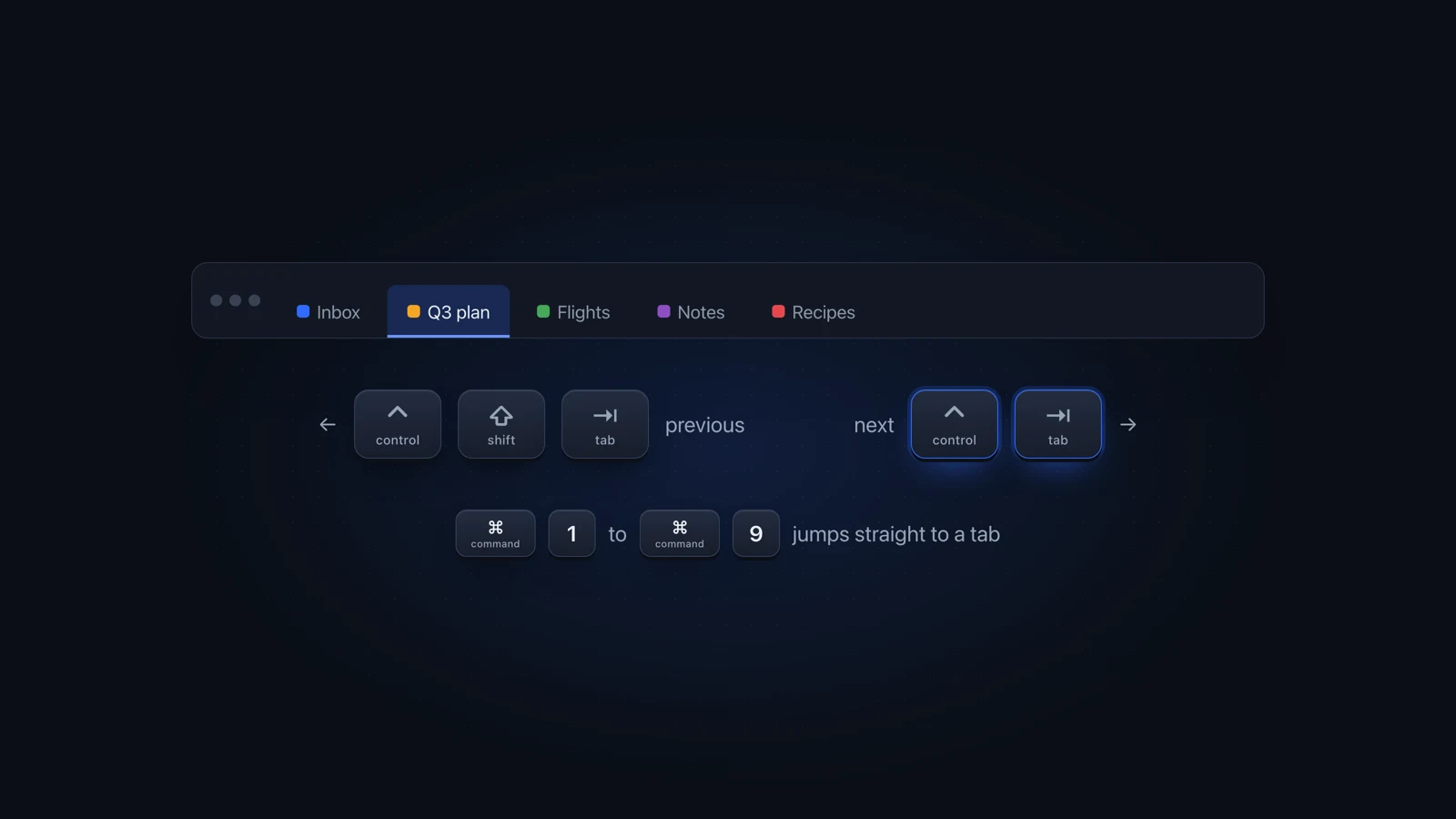
To switch tabs on a Mac in Safari, Firefox, Chrome or Brave, press Control-Tab for the next tab and add Shift to go back. Chrome and Brave also list Command-Option-Right Arrow and Left Arrow. Command-1 to Command-8 jumps to a tab by position, and Command-9 to the last tab.
Julien Schweter Updated 6 min read
The short version
- Edge uses Command-Fn-Down Arrow and Command-Fn-Up Arrow, and Arc swaps Fn for Option.
- In Safari, Command-1 to Command-9 work only while a Tabs setting is on.
- Only Firefox (after one setting) and Arc document a jump back to the last used tab.
- None of them reach a tab in another window or browser.
To switch between tabs, Mac browsers let you step one tab at a time or jump to a tab by its position. Firefox and Arc can also jump back to the tab you used last.
| Item |  Chrome Chrome |  Brave Brave |  Safari Safari |
|---|---|---|---|
| Next tab Chrome and Brave: Control-Tab works too, though Google's list leaves it out. | Command-Option-Right Arrow | Command-Option-Right Arrow | Control-Tab |
| Previous tab | Command-Option-Left Arrow | Command-Option-Left Arrow | Control-Shift-Tab |
| Tab 1 to 8 Safari: needs "Use ⌘-1 through ⌘-9 to switch tabs" in Tabs settings. | Command-1 to Command-8 | Command-1 to Command-8 | Command-1 to Command-8 |
| Last tab in the row | Command-9 | Command-9 | Command-9 |
| Last used tab | none | none | none |
| Reopen closed tab | Command-Shift-T | Command-Shift-T | Command-Shift-T |
| Show all tabs Safari calls this view Tab Overview. | none | none | Command-Shift-Backslash |
| Item |  Firefox Firefox |  Edge Edge | Arc |
|---|---|---|---|
| Next tab Firefox: Control-Tab changes meaning if recently used order is on. | Control-Tab | Command-Fn-Down Arrow | Command-Option-Down Arrow |
| Previous tab | Control-Shift-Tab | Command-Fn-Up Arrow | Command-Option-Up Arrow |
| Tab 1 to 8 | Command-1 to Command-8 | Command-1 to Command-8 | Command-1 and up |
| Last tab in the row | Command-9 | Command-9 | none |
| Last used tab | Control-Tab, after a setting | none | Control-Tab |
| Reopen closed tab | Command-Shift-T | Command-Shift-T | Command-Shift-T |
| Show all tabs | Control-Shift-Tab, after a setting | none | none |
Each shortcut comes from the maker's list: Apple's Safari shortcuts, Google's Chrome shortcuts, Mozilla's Firefox shortcuts, Microsoft's Edge shortcuts, Brave's shortcuts and Arc's shortcuts. A dash means the maker lists none for that job.
Control-Tab moves to the next tab in four of the six. Edge lists other keys, and in Arc it goes to your last used tab. To search your tabs by name instead, see how to find any open tab on your Mac.
Safari and Firefox each have a setting that changes their tab keys, and Edge lists one key that macOS keeps for itself.
- Apple also lists Command-Shift with the square bracket keys for next and previous tab.
- If Command-1 does nothing, open Safari Settings, click Tabs and turn on "Use ⌘-1 through ⌘-9 to switch tabs".
- Command-Shift-Backslash opens Tab Overview, which shows your open tabs as thumbnails. Its search has limits: see searching Safari tabs in every window.
- To find a tab by name instead of stepping to it, use Chrome's Tab Search, covered in Chrome Tab Search on a Mac.
- Brave's help page lists the same keys as Chrome for moving one tab, jumping by position and reopening a tab.
- Command-Option-Right Arrow and Command-Option-Left Arrow always move one tab in order, whatever your settings.
- With "Ctrl+Tab cycles through tabs in recently used order" on, Control-Tab goes by recent use and Control-Shift-Tab shows all tabs.
- Microsoft's Mac list also names Command-Tab for the next tab, but macOS uses Command-Tab to switch apps. Use the Fn keys from the table.
Firefox and Arc can flip between your two most recent tabs. Chrome, Safari, Edge and Brave have no documented shortcut for it.
-
In Firefox, open Settings
-
Turn on the recently used order
Check "Ctrl+Tab cycles through tabs in recently used order".
-
Press Control-Tab
You land on the tab you used before this one. Press it again to go back.
In Arc, Control-Tab toggles between your recent tabs with no setting needed. In the other four browsers, put the second page in its own window, then flip between the windows with Command-Backtick, which Apple lists for Safari.
In Safari, yes: pinch closed on the trackpad to open Tab Overview, then click the tab you want.
- Apple describes the pinch in its Safari 14 guide, though the current guide no longer mentions it.
- Chrome, Firefox, Edge and Brave list no trackpad gesture for changing tabs.
When you switch tabs, Mac keyboard layouts barely matter: Tab, Control, Option, Command and the arrow keys sit in the same place on all of them.
- On a German or French layout, the window shortcut Command-Backtick sits on a key that types another character. Pick your layout above the shortcut table to see it.
- On a German layout, [ is Option-5, ] is Option-6 and the backslash is Option-Shift-7, so the bracket and Tab Overview shortcuts can move.
Bring that window to the front first. Tab shortcuts only work inside the front window.
- In another window of the same browser, press Command-Backtick until it comes forward, then use the tab keys. For Chrome, switching between Chrome windows has more ways.
- In another browser, press Command-Tab to switch to it, then find the window and the tab.
- On another desktop or in a minimized window, the tab keys can't reach it. Switching windows on a Mac has the built-in ways to get there.
Questions people ask
What is the shortcut to switch tabs on a Mac?
In Safari, Firefox, Chrome and Brave, Control-Tab goes to the next tab and Control-Shift-Tab to the previous one. Chrome and Brave also list Command-Option-Right Arrow and Left Arrow, and Edge lists Command-Fn-Down Arrow and Up Arrow. Command-1 to Command-8 picks a tab by position.
How do I toggle between two tabs?
In Firefox, turn on "Ctrl+Tab cycles through tabs in recently used order" in Settings, and Control-Tab takes you back to the tab you used before. Arc does this with Control-Tab by default. Chrome, Safari, Edge and Brave don't list a shortcut for it, so put the second page in its own window and flip with Command-backtick.
Does Ctrl+Shift+T work on Mac?
On a Mac, use Command-Shift-T instead. It reopens the last closed tab, and Chrome, Safari, Firefox, Edge, Brave and Arc all list it. In Chrome and Firefox, pressing it again brings back the tab you closed before that. Safari and Firefox also use it to reopen a closed window.
How do I switch tabs on a Mac with the trackpad?
In Safari, pinch closed on the trackpad to open Tab Overview, then click the tab you want, as Apple described in its Safari 14 guide. Apple's current guide no longer lists the gesture, and Chrome, Firefox, Edge and Brave list no trackpad gesture for switching tabs.
How do I switch to a tab in another window?
Bring that window forward, then use the tab shortcuts. Command-backtick cycles through the windows of the app you're in, and Command-Tab gets you to another browser. A Mac-wide switcher such as Better Window Switcher shows windows and tabs from several browsers on one shortcut.
Checked on Safari 26.5, Chrome 153 and Firefox 156 on macOS Tahoe 26, plus the Edge, Brave and Arc help pages.
Read next
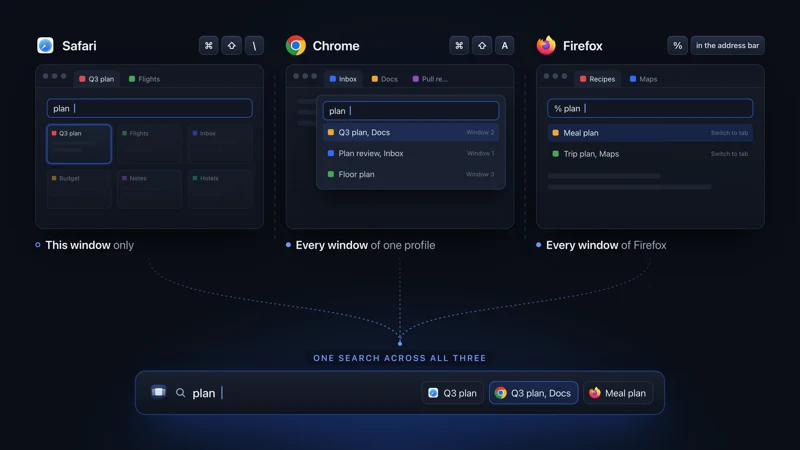 Tabs on Mac See all open tabs on a Mac How to see all open tabs on a Mac: Command-Shift-A in Chrome, % in Firefox, Tab Overview in Safari, and what to use when your tabs span several browsers.
 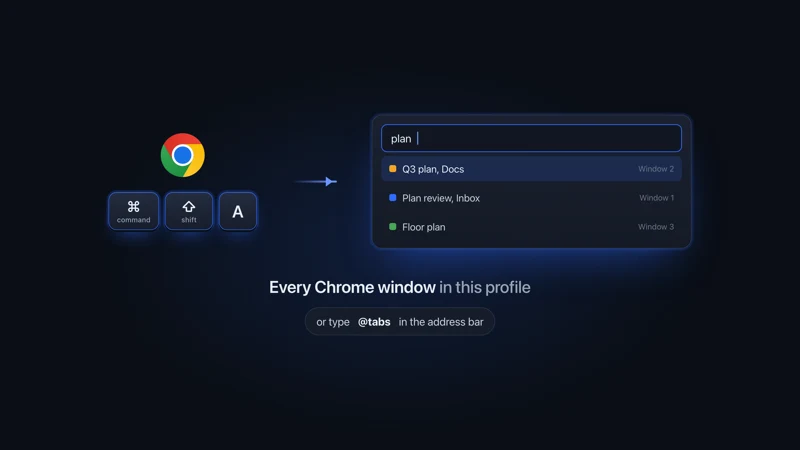 Chrome on Mac Chrome Tab Search on Mac Chrome Tab Search on a Mac opens with Command-Shift-A and searches every window of one profile. If the button is missing, you can pin it back in Settings.
 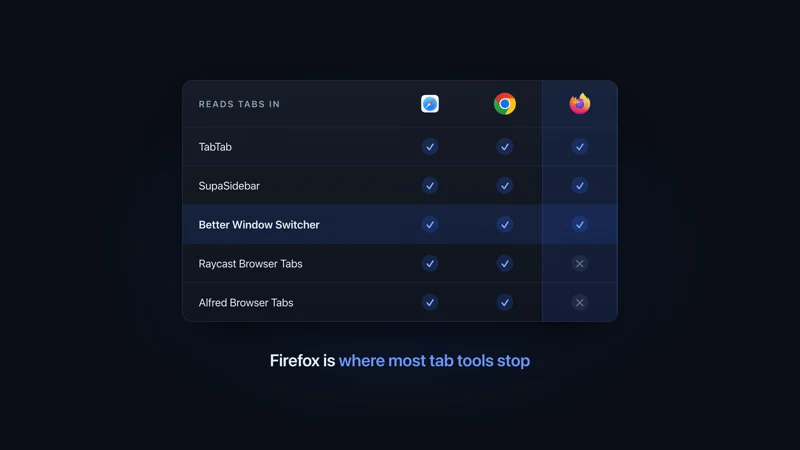 Tab apps for Mac Tab switchers for Mac, compared Tab switchers for Mac compared by browser: which ones read Safari, Chrome, Firefox and Arc tabs, which switch windows too, and what each one costs.
 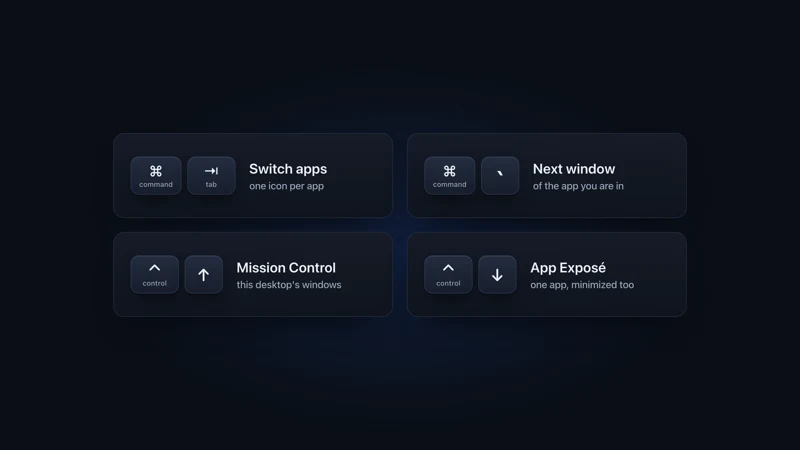 Windows on Mac Switch windows on a Mac Switch between windows on a Mac with Command-backtick, Mission Control or App Exposé: what each built-in shortcut shows, and what to add past a few windows.
More comparisons
Compare to other popular apps